
The Classwork tab is the place to go for an aggregate analysis of all types of work completed by your classes and students. It's also where you can assign homework to classes of students.
Some tutors and tutoring organizations will find this area very useful, especially if you are running classes or organizing students into groups. Learn more about Creating Teachers and Linking Teachers to Students
| Reminder: You can use the Class dropdown (upper left corner) to filter the results on this page. |
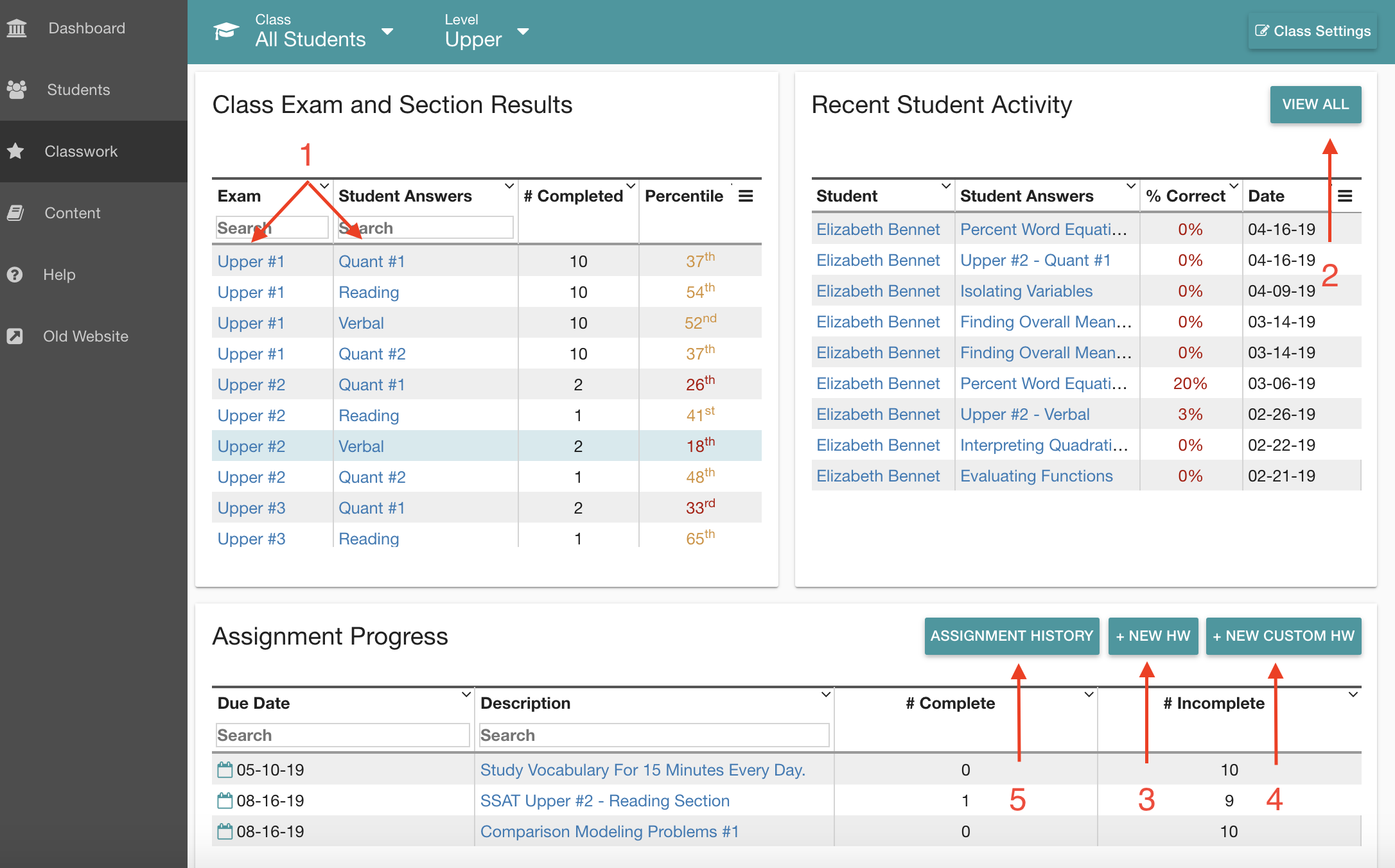
From the Classwork tab, you'll see a snapshot of (1) completed practice test sections with average percentiles. Click into an exam title (e.g. Upper #1) or section title (e.g. Reading) to view aggregate results. Learn more about Viewing Aggregate Student Results
To the right, you'll see Recent Student Activity. Here, you can see which students have recently logged in and engaged with the platform. Clicking into (2) View All will give you granular results for the work students have done, including time spent, incorrect and correct totals, and percentiles.
If you want to assign work accordingly, scroll down to create (3) New HW (pick-list of test sections and practice exercises), create (4) New Custom HW (where you could add a link to external resources or explain a custom task like "review at least two questions you got wrong and be ready to explain the correct answer"), or view past (5) Assignment History and results.
| See also: Assigning Classwork |